Process
Week 11: Global Settings, Camera Director & Render Aesthetics
Mar 24 - Mar 30, 2026Goals
- Complete and import first SpeedTree tree models into Unity
- Develop particle system further and integrate into micro zone behavior
- Finalize the ambient chord progression and begin mixing with natural audio textures
- Continue micro zone refinement with new assets in place
What I Accomplished
ForestGlobalSettings ScriptableObject
Built a new ScriptableObject that acts as the single source of truth for all four micro zones simultaneously. Previously, tuning the zones meant touching each controller individually — a slow and error-prone process that made aesthetic iteration painful. Now a single asset controls growth dynamics, layer thresholds, scale ranges, breathing animation, firefly behavior, and all camera parameters. Changing any value updates every zone live in Play mode, which makes it possible to actually feel the effect of a tweak in real time rather than guessing at it. Zone-specific properties — radius, prefab lists, seed, camera index — remain local to each controller, so the system is shared where it makes sense and individual where it has to be.
The asset also includes a global biomass override: a freezeAllBiomass toggle and a globalBiomass slider at the top that push all four zones to an identical value instantly. This was immediately useful for evaluating visual quality without a live camera feed. Being able to lock the zones at 0.5 or 1.0 and focus purely on how they look, without the data pipeline involved, made aesthetic work significantly faster.
MicroForestZoneController: Globals Integration
Updated the zone controller to accept the shared globals asset via an inspector field. When the asset is assigned, all shared parameters read from it. When it is null, the controller falls back to its own local fields as before. This means the architecture is strictly additive — existing per-zone setups continue to work without modification, and the shared system layers on top rather than replacing anything. The global biomass override path was also added here, so zones obey the freeze state and value from the asset before consulting their own biomass input.
ForestCameraDirector
Wrote a new camera director that handles autonomous movement across all four zones. It operates as a two-state machine: a ZoneTour and an Overview mode.
In ZoneTour, the camera visits zones 0 through 3 in sequence, positioning itself relative to each zone's actual 3D location. This was important to get right — the zones are at different floor levels in the building, and a naive implementation that computed positions from a fixed origin left the camera stranded at ground level while zones were elevated. The director now reads each zone's world position and offsets from there, so the camera is always physically inside the zone it is visiting regardless of where it sits in the building.
After completing a full tour, the camera transitions to Overview mode. It auto-computes the bounding sphere of all zones dynamically, finds their 3D centroid, and orbits around it at a configurable height with a wider field of view. The bounding sphere computation is live, so even if zone positions change the overview adapts. After a configurable duration it returns to the tour.
Biomass spike detection interrupts the tour mid-sequence to cut directly to whichever zone just spiked. The component also supports right-click force transitions in the inspector header, which makes testing any state trivial without waiting for timers.
ForestCameraDirector in action — ZoneTour visiting elevated zones, transitioning to bounding-sphere Overview orbit.
CAD Model Import & Zone Placement
Continued work on importing the Atlas CAD model and accurately placing the four micro zones within it. Getting the spatial mapping right is load-bearing for the camera director — the camera positions and overview centroid only make sense if the zones actually correspond to their real-world locations inside the building.
Ambient Audio Progress
Made incremental progress on the secondary interactive element's music component. The ambient chord progression from last week continued to develop, though this remained a smaller focus area relative to the visual systems work.
Key Insights
- A shared settings asset changes how you work, not just how the code works — Centralizing parameters into one ScriptableObject made aesthetic iteration a qualitatively different activity. Tuning became something that could be felt in real time rather than inferred from isolated edits. The feedback loop compression matters as much as the technical architecture.
- Camera position is relative to scene geometry, not scene origin — Computing camera offsets from world origin rather than zone position produced plausible-looking but spatially wrong results that were hard to notice until the zones were actually at different heights. Anchoring movement to zone world position fixed this cleanly and will generalize to any future layout.
- Live bounding sphere computation pays for itself — It would have been faster to hardcode the overview centroid, but the dynamic approach means the camera system is resilient to layout changes without any maintenance cost. The overview always frames exactly what is in the scene.
- Global overrides accelerate visual development — The ability to freeze all zones at a fixed biomass value decoupled aesthetic work from the data pipeline entirely. Visual quality and system behavior can now be evaluated and iterated independently, which is a meaningful improvement in iteration speed at this stage of the project.
Next Week Goals
- Implement lighting system and firefly particle prefab
- Hook up wind simulation to vegetation layers
- Begin cloud and rain system implementation
- Continue SpeedTree growth stage development and asset import
- Complete CAD zone placement and begin two-PC network test
Week 10: Atlas Rebuild, SpeedTree, Particles & Ambient Audio
Mar 10 - Mar 16, 2026Goals
- Finalize SpeedTree custom tree models and import into Unity
- Complete asset evaluation and integrate final vegetation set into micro zones
- Implement interactive audio changes based on human testing feedback
- Continue refining micro zone behavior and visual fidelity
What I Accomplished
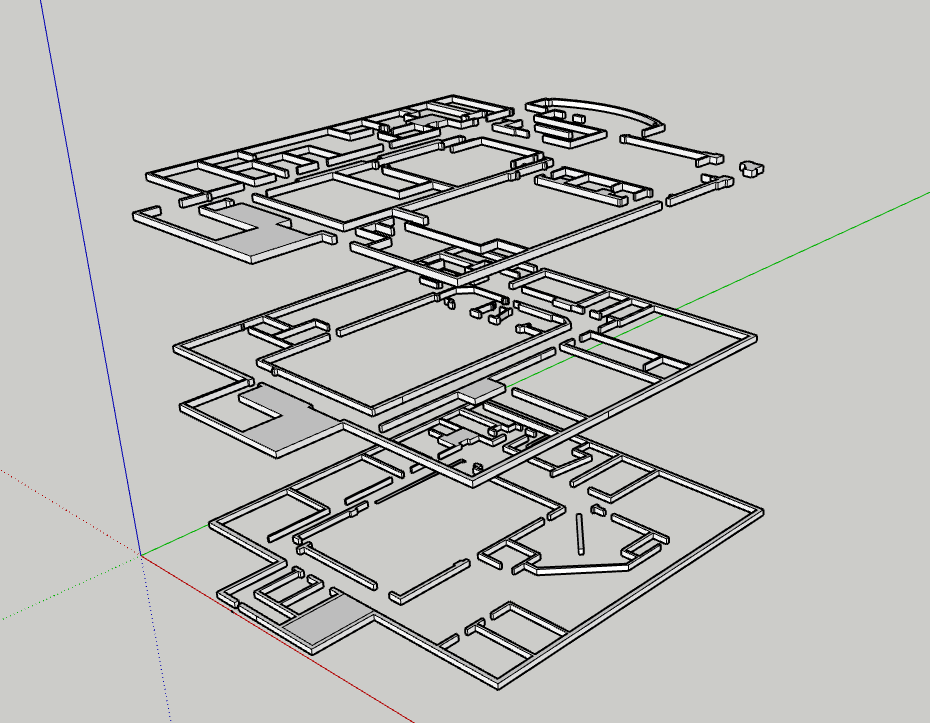
New Atlas Building CAD Model
Rebuilt the Atlas CAD model from scratch. The original was usable but not accurate enough - proportions were off and the geometry was rough. The new version is much more faithful to the real building and cleaner to work with in Unity. Since the micro zones map directly to physical locations in the building, getting this right makes a real difference.
Micro Zone Behavior Improvements
More tuning on the growth curves and layering logic. The zones are noticeably more reactive now - small data shifts read clearly, and sustained high activity produces genuinely dense growth. The difference between a dormant and an active zone is much more dramatic, which is important for legibility from across the room.
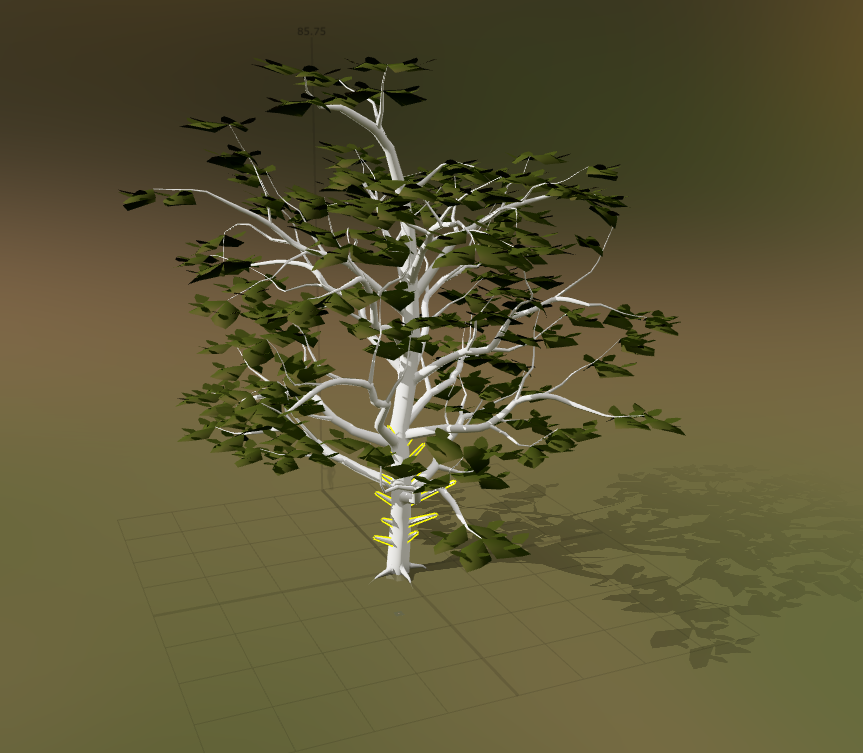
SpeedTree Asset Creation
Started building my own trees in SpeedTree instead of relying on asset packs. The parametric workflow lets me design specifically for this project - right polygon count, right silhouette, right scale for how the zones will be viewed. First models are in progress and the process is working well.
Particle System Experiments
Started playing with Unity's particle system to add another layer of life to the zones. Thinking drifting spores, light motes, subtle pollen - things that keep the scene feeling active even when growth values are low. Early tests look good. The main challenge is keeping it subtle so it doesn't compete with the forest visually.
Ethereal Ambient Chord Progression
Started composing the default ambient audio for the installation - the baseline sound before any poses are detected. Going with a slow ethereal chord progression rather than straight nature sounds, based on what landed better in human testing. The idea is something that feels more than it's heard, setting an emotional tone before visitors even start interacting.
Key Insights
- Spatial accuracy compounds - A more precise CAD model improves everything downstream. Zone placement, camera mapping, and visual layout all become more coherent when the foundational geometry is right.
- Custom assets are worth the time investment - Generic tree packs force compromises in silhouette, scale, and rendering cost. Building in SpeedTree directly means the assets serve the project rather than the project adapting to the assets.
- Particles add life at low cost - A sparse particle layer can make a static or low-activity scene feel inhabited. The micro zones benefit from something moving even when growth is minimal.
- Ambient sound sets the emotional register - The chord progression work made clear that baseline audio is not background filler - it actively shapes how visitors perceive and approach the installation before anything else happens.
Next Week Goals
- Complete and import first SpeedTree tree models into Unity
- Develop particle system further and integrate into micro zone behavior
- Finalize the ambient chord progression and begin mixing with natural audio textures
- Continue micro zone refinement with new assets in place
Week 9: Micro Zone Polish, Slideshow & SpeedTree Development
Mar 3 - Mar 9, 2026Goals
- Improve the slideshow
- Create SpeedTree workflow and custom tree models
- Continually improve micro zones
- Interactive audio: implementation of human testing feedback
What I Accomplished
Micro Zone Aesthetics & Performance
This week the micro zone system received its most significant visual and behavioral upgrade yet. Previously, prefabs would snap in and out of existence as the biomass value crossed thresholds - a jarring visual artifact that broke the illusion of organic growth. I replaced that binary instantiation model with a continuous dynamic scaling approach. Prefabs now enter the scene at near-zero scale and grow smoothly into their full size, and they shrink back out just as gracefully when conditions fall. The zone never pops; it breathes.
On top of the scaling transitions, I added a subtle per-prefab scale jitter system. Each plant oscillates gently on a randomized frequency and amplitude, giving the scene a quiet organic restlessness. No two plants move in sync, which makes the overall forest feel alive rather than simulated. The performance overhead is minimal since it operates on existing transform data rather than spawning or destroying objects.
I also built out grass as a carpeted base layer. Rather than individual scattered blades, the grass now grows in as a dense continuous field that emerges from the ground up as biomass increases. This grounds the scene spatially and adds a sense of scale and depth that was missing before. The grass layer activates first, before taller vegetation, which mirrors natural succession and makes the growth progression feel more ecologically grounded.
Slideshow & Demo Video
The project slideshow is complete. It now includes a proper demo video that captures the micro zone system in action - growth transitions, the jitter system, and the grass base layer all visible in real time. Having a high-quality video artifact is important for communicating the project to audiences who cannot experience it live, and this version genuinely represents the current state of the simulation well. The slideshow as a whole is now polished and ready for presentation.
In Progress
- SpeedTree asset creation - I am actively building custom tree models in SpeedTree to replace placeholder assets in the micro zones. The workflow is established and the first models are taking shape, but none are finalized and imported yet. SpeedTree gives precise control over branch density, trunk taper, leaf distribution, and wind response, which will dramatically elevate the visual quality of the zones compared to generic asset store trees. This is an ongoing effort that will continue into next week.
- Asset search - Alongside custom tree creation, I am conducting a broader search for high-quality complementary vegetation assets: understory plants, ferns, mosses, and ground cover that fill in the mid and low layers of each micro zone. The search has been fruitful - several strong candidates have been identified - but the evaluation and integration process is still in progress. Final asset selection depends on how the SpeedTree models develop, since I want the visual language to be cohesive.
Key Insights
- Smooth transitions are the difference between simulation and presence - The shift from binary pop-in to dynamic scaling fundamentally changed how the micro zone feels. The forest now convinces in a way it did not before. Small behavioral changes carry disproportionate perceptual weight.
- Layered growth mimics ecology - Designing the grass carpet to emerge first, followed by low shrubs and then taller trees, mirrors real plant succession. The installation does not need to be botanically precise, but growth that follows a plausible biological logic reads as more believable and more meaningful.
- Jitter is underrated - Subtle randomized motion at the individual plant level creates the impression of a living system with almost no computational cost. Life in the visual sense is often just asymmetric, non-repeating motion.
Next Week Goals
- Finalize SpeedTree custom tree models and import into Unity
- Complete asset evaluation and integrate final vegetation set into micro zones
- Implement interactive audio changes based on human testing feedback
- Continue refining micro zone behavior and visual fidelity
Week 8: Motion Data Type, Human Testing, Micro Zone MVP
Feb 24 - Mar 2, 2026Goals
- Complete node aggregation for multi-computer setup
- Finish motion tracking / blob centroid implementation
- Rebuild and import the Atlas CAD model into Unity
- Finalize installation screen layout
What I Accomplished
Motion Tracking
This week I added a new environmental data type to the camera system: motion level. Beyond simple person count and ambient noise, each camera now computes aggregate motion intensity by analyzing frame-to-frame pixel differences and tracking blob centroids across time. This allows the system to measure not just presence, but energy. A quiet stationary crowd produces a very different signal than an active moving one. This data will eventually influence localized forest behavior inside each Micro Zone, adding a temporal and spatial layer to the simulation.
Human Testing: Forest Audio - In-Room Interactive Element
I conducted structured human testing with one classmate, my professor, and three additional participants. The interactive audio system runs independently from the main Unity simulation and uses skeletal pose detection through a standalone webcam. There is a persistent baseline ambient track, and four distinct poses trigger layered environmental sounds: birds, crickets, wind, and rain. During testing, the four sounds were randomly mapped to four poses: both arms down, T-pose, one arm up, and both arms up. The poses were intentionally simple, highly differentiated, and easily repeatable to ensure detection reliability.
The most significant finding was the universal reaction to rain. When rain activated, participants immediately expressed stronger emotional engagement. Several testers described a shift in mood and a clearer understanding of the installation’s intention when the rain layer began. Many suggested that rain should be mapped to a pose with both arms lifted upward, as if physically receiving the rain. This was a strong and consistent piece of feedback, and it aligns conceptually with the embodied nature of the system. Rain felt immersive not only because of its sonic texture, but because it changed the emotional tone of the room.
Another major insight concerns audio transitions. There is a delicate balance between sharp contrast, which makes the interaction legible, and smooth blending, which preserves immersion. If sounds enter too abruptly, the illusion breaks. If they fade too gently, the interaction becomes ambiguous. Future iterations will require careful audio mixing, dynamic layering control, and likely compression and spatialization adjustments, especially since testing was done with headphones while the final installation will use speakers.
The baseline ambient layer was also tested in two variations: forest ambience and ethereal harmonic chords. Both were well received for different reasons. The forest ambience grounded the space in realism, while the harmonic layer elevated it into something more abstract and contemplative. The next iteration will combine both in a restrained way, creating a hybrid sonic floor that supports both naturalism and atmosphere.
Another design question surfaced during testing: how will participants know that poses exist? Currently there is no explicit instruction. Some testers experimented intuitively, while others hesitated. I need to determine whether pose guidance should exist inside the room as subtle visual language, outside the room as contextual framing, or remain discoverable through exploration. This is a balance between clarity and preserving the visual integrity of the forest simulation.
A few participants were familiar with pose-controlled audio systems from social media and attempted to raise and lower their arms slowly to search for gradients between sounds. This raised an important architectural question: should the system interpolate continuously between pose states, or remain discrete and event-based? For now, I am leaning toward discrete pose states for clarity, but this remains an open design decision.
Finally, I determined that simultaneous pose detection must layer sounds rather than override them. When multiple participants trigger different poses at the same time, their corresponding audio elements should accumulate. This makes the system feel collective rather than competitive and prevents individuals from feeling excluded. It also increases perceived complexity and responsiveness.
Micro Zones
Continued iterating on the micro zone system, refining how incoming sensor data maps to growth behavior within each zone.
Node Aggregation
After evaluating wireless syncing, OSC relays, and local server relays, I decided that the most stable and lowest-latency solution for the expo environment is a direct wired Ethernet connection between the two machines. A long dedicated Ethernet cable will connect my detection desktop to the primary Unity render machine. This simplifies networking, reduces points of failure, and ensures reliable data aggregation into a unified metrics stream during the live installation.
Key Insights
- Embodied interaction amplifies meaning – The rain response demonstrated that when audio aligns emotionally and physically with a gesture, the installation shifts from reactive system to lived experience.
- Sound design is structural, not decorative – Audio mixing, layering, and transition design are as critical as visual growth algorithms. The success of the immersive component depends on this balance.
- Clarity vs mystery is a design tension – Revealing the existence of poses too explicitly risks diminishing discovery, but hiding them too much reduces interaction. The installation must carefully manage how knowledge is introduced.
- Collective layering strengthens the system – Allowing multiple simultaneous pose triggers makes the installation feel collaborative and socially aware rather than individually reactive.
Next Week Goals
- Improve the slideshow
- Create SpeedTree workflow and custom tree models
- Continually improve micro zones
- Interactive audio: implementation of human testing
Week 7: Noise Tracking, Forest Audio, and Multi-Node Architecture
February 17-23, 2026Goals
- Add a second data type to the camera system beyond person count
- Build an in-room interactive element for the installation
- Continue micro zone development
- Begin multi-node data aggregation for the final expo hardware setup
What I Accomplished
Noise Level Tracking
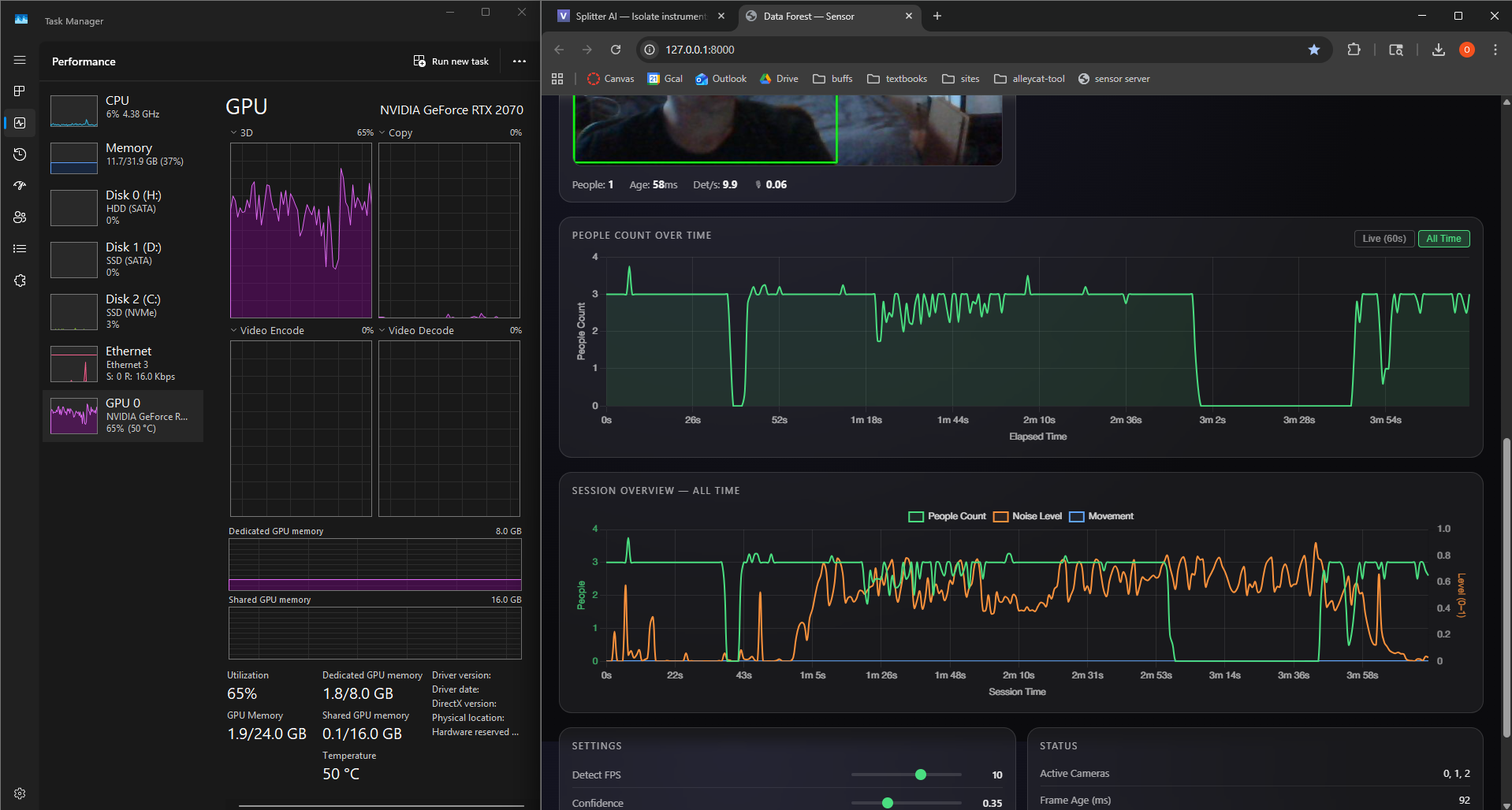
Integrated microphone-based noise level tracking into the existing camera system, using the webcam microphones already present in the setup. Noise level is now captured continuously alongside person count and plotted as a third stream in the session dashboard. This adds ambient sound energy as a meaningful environmental signal - a busy, loud space will read very differently from a quiet one, giving the installation richer data to grow from.
Forest Audio - In-Room Interactive Element
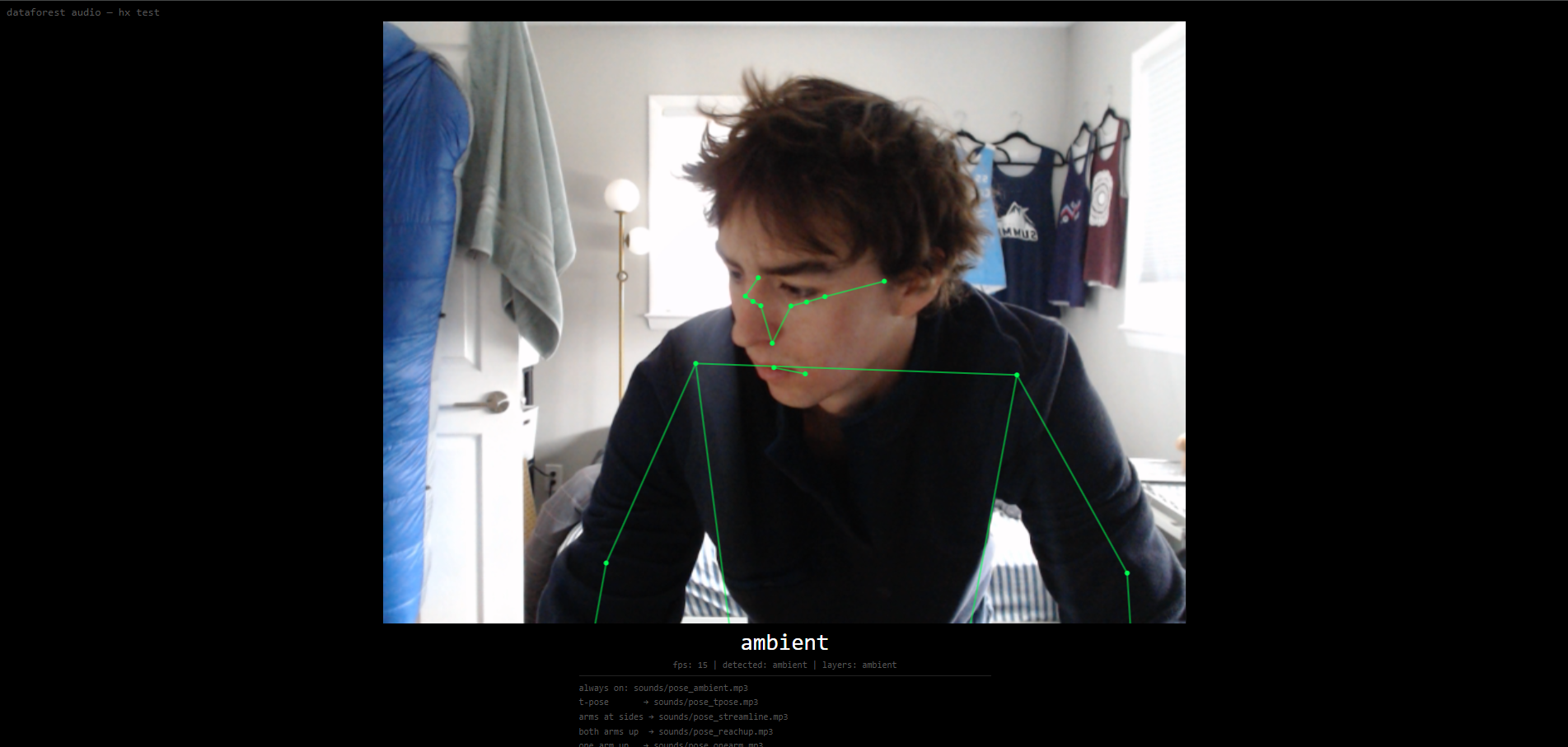
Built a standalone interactive piece as a separate small repository: a single HTML file that runs entirely in the browser. It uses the webcam to detect people and - more specifically - where their body parts are, tracking full skeletal poses in real time. Based on the detected pose, it modifies the audio of the installation.
There are four distinct poses mapped to different nature soundscapes: birds chirping, crickets, rain, and wind through trees. These layer on top of a persistent ambient track that is always present. The result is a direct, physical interaction where visitors' body positions shape what the room sounds like - a complement to the visual forest growing on the screens.
Micro Zones
Continued iterating on the micro zone system, refining how incoming sensor data maps to growth behavior within each zone.
In Progress
- Node aggregation - For the final expo, the installation will run across multiple computers: one powerful machine handling the main Unity render, and my desktop handling camera detection. Getting these nodes to properly aggregate their data into a single unified metrics stream is critical for the multi-machine setup to work. I started building this aggregation layer this week but it is not yet complete.
- Motion tracking / blob centroid tracking - A third data type captured from the webcams, tracking movement and the spatial centroid of detected blobs across the frame. This would add a spatial dimension to the data - not just how many people, but where they are and how much they're moving. Work has begun but is not done.
Key Insights
- Audio as a first-class output - The Forest Audio piece revealed that sound is a powerful and underexplored dimension of the installation, one that responds to human presence in a much more intimate way than a large screen
- More data types = richer expressiveness - Noise level and motion add texture to a signal that was previously just a headcount; the forest can now respond to energy, not just presence
Next Week Goals
- Complete node aggregation for multi-computer setup
- Finish motion tracking / blob centroid implementation
- Rebuild and import the Atlas CAD model into Unity
- Finalize installation screen layout
Week 6: Unity Assets, MicroZones, and Camera Refinement
February 10-17, 2026Goals
- Scale up the MVP simulation with more assets and a more complex OSC architecture
- Import the Atlas building CAD model into Unity
- Bring multiple potential designs to life for human testing
- Browse assets and test truly dynamic FBX models and L-systems
What I Accomplished
Unity Assets
Conducted some research in Unity Asset Store trying to fidnt eh right trees and foliage models. Ideally these will be inexpensive, easy to work with, and have full FBX generative growth parametrs for a smooth final output. So far in my testing, I have not landed on a final asset pack or anything like that, but i have been importing free packs and using them to test my Micro Zone system.
Micro Zones
Each camera in the final installation will feed data into the system individually, and have a corresponding area of growth within the simulation based on the data it sees. These I am calling Micro Zones. I built the first minimum viable micro zone over the past week. How it works: It consists of a bounded spawn area, a curated set of vegetation assets, and a growth controller that maps incoming camera metrics to a continuous biomass value. That biomass parameter then drives staged instantiation, scaling, and visual effects so the zone develops smoothly from sparse seedlings into a dense micro-forest as activity increases.
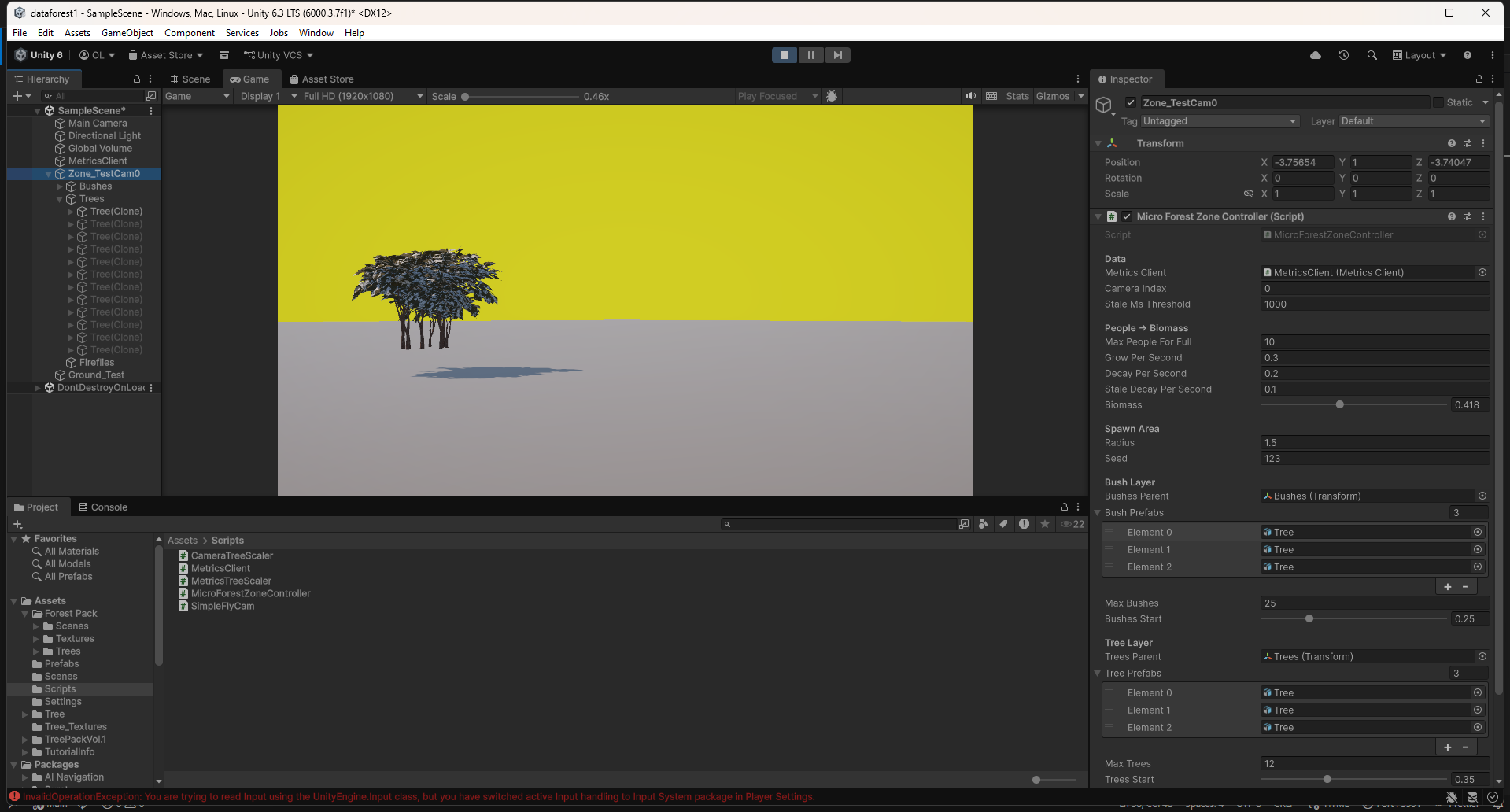
Camera Refinement
Since the final installation's main render will likely occur on a diferent computer than my own, this has opened the door for me to evolve my camera detection software to collect data between multiple machines, and aggregate them into one /metrics location. The plan is to have the large powerful computer that I will borrow in the basement doing the main render + 1-2 cameras, with my personal desktop machine in one of the upper floors running just camera detection and aggregation of the data. This also means the installation will benefit from a smaller camera detection folder size for ease of transfer between computers via thumbdrive, and my gpu is freed up on my personal desktop. As a result, I refined the efficiency of the camera detection to take advantage of CUDA GPU processing, and built an aggregator for a multi-node hardware architecture.
Key Insights
- Camera detection needs to be fast and flexible - Optimizing the software now will make my life so much easier in the future, and will make the project work better/ faster.
- Micro Zones need behavioral refinment and proper assets - Finding ideal assets is hard as a good price point
Next Week Goals
- Micro zones
- Rebuild ATLAS CAD model and import it
- Installation screen layout
Week 5: Expert Interviews & Pivoting to Unity
February 3-9, 2026Goals
- Seek expert feedback on the project direction and technical approach
- Validate aesthetic and interaction design decisions
- Evaluate whether TouchDesigner is the right tool for the 3D visualization
What I Accomplished
Expert Interviews
Conducted two expert interviews that shaped the project's direction. Joel Swanson (artist & design professor) pushed me toward localized per-camera tree growth, suggested intermittent live events for engagement, and recommended a TV display over projection. Brad Gallagher (motion capture & interactive media) identified that TouchDesigner was the wrong tool for 3D world-building and recommended Unity with OSC as the communication protocol. See the Expert Reviews page for detailed feedback from both conversations.
Camera Spoofing System
Built a spoofing system that simulates any number of cameras with configurable person counts. This lets me test how the visualization responds to different crowd scenarios without needing physical cameras or real foot traffic.
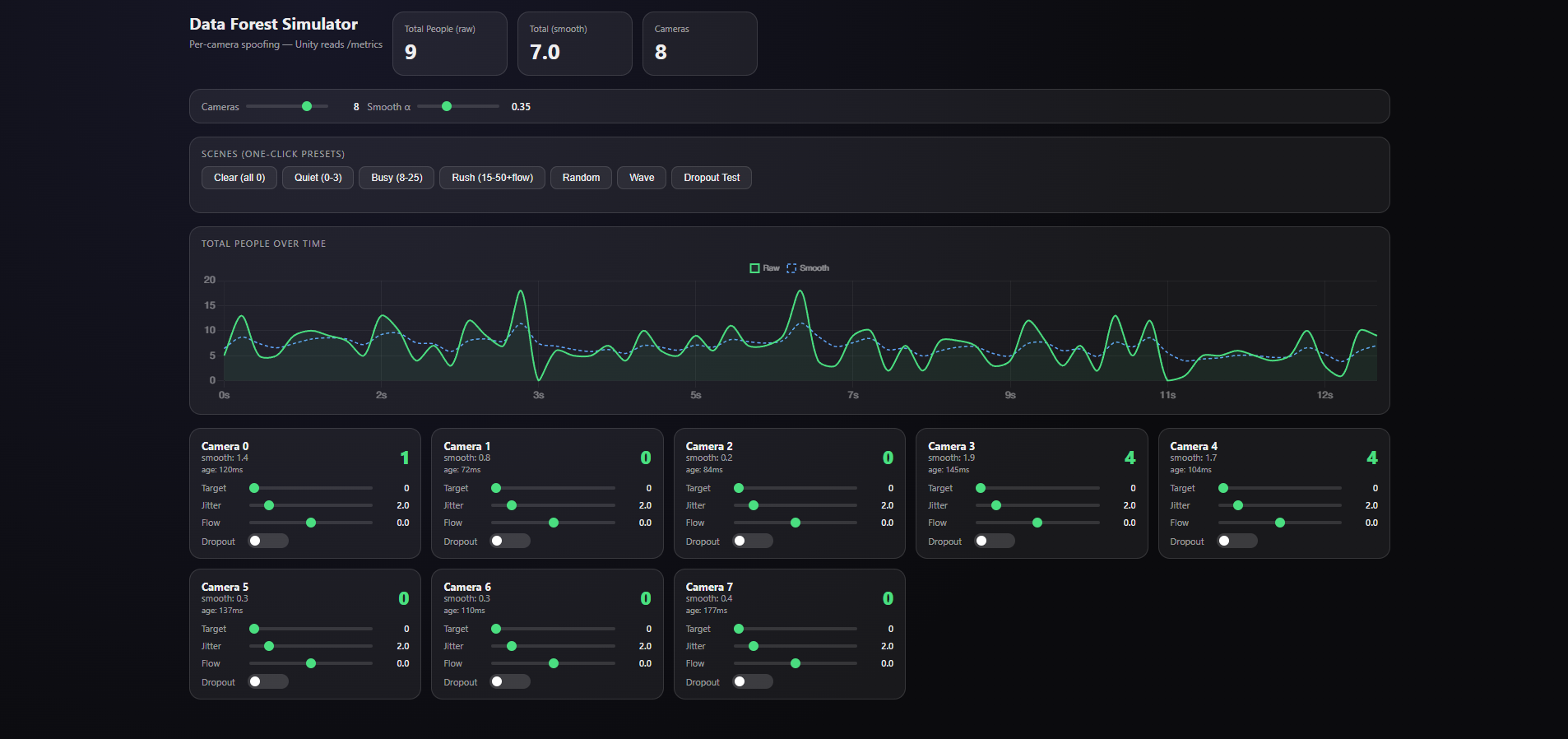
Pivoting to Unity + First Proof of Concept
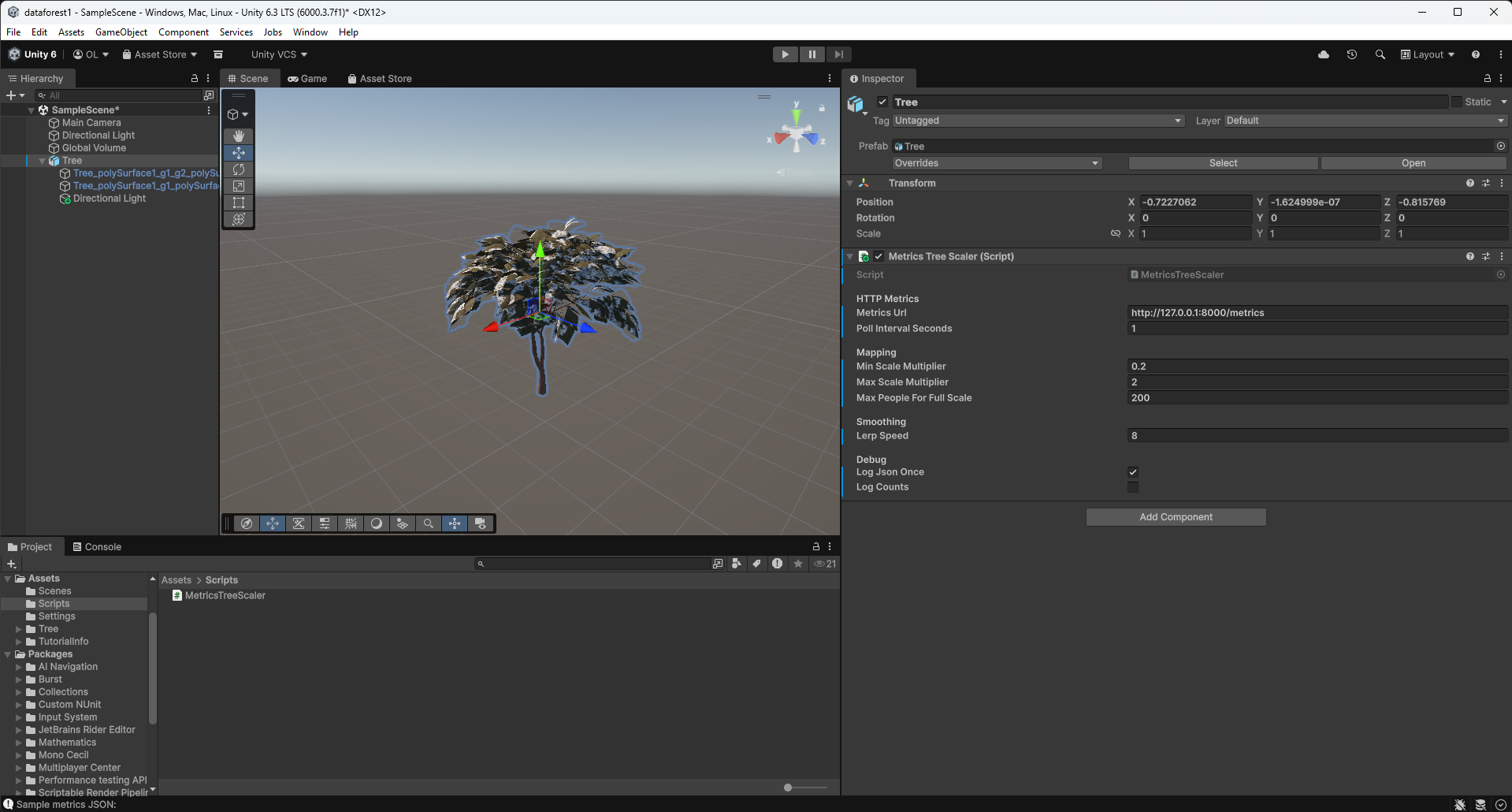
Based on Brad's advice, I pivoted the visualization layer from TouchDesigner to Unity, using OSC to send detection data instead of HTTP. Got the first camera-reactive scene working the same week: a tree that grows based on the number of people detected. This validated the full pipeline from camera detection through to 3D visualization.
Key Insights
- Pivot early, not late - Better to switch tools while the investment is low than to fight limitations for weeks
- Expert feedback is invaluable - Both interviews surfaced ideas and approaches I wouldn't have found on my own
Next Week Goals
- Scale up the MVP simulation with more assets and a more complex OSC architecture
- Import the Atlas building CAD model into Unity
- Bring multiple potential designs to life for human testing
- Browse assets and test truly dynamic FBX models and L-systems
Week 4: CAD Modeling, Presentation & Pipeline Refinement
January 27 - February 2, 2026Goals
- Build a CAD model of the Atlas building for use in the installation
- Prepare and deliver the iteration 1 presentation
- Test the camera detection system in a real-world environment
- Refine the camera detection pipeline and address computing power limitations
What I Accomplished
Atlas Building CAD Model
Built a 3D CAD model of the Atlas building covering the bottom three floors: the main floor, basement (B1), and subbasement (B2). This model serves as the spatial foundation for the forest simulation - it maps the physical space where cameras will detect people and where trees will grow in the visualization. I identified key high-traffic areas: the main atrium entrance, hallways near room 104, the B1 area around 1B25, and the black box.
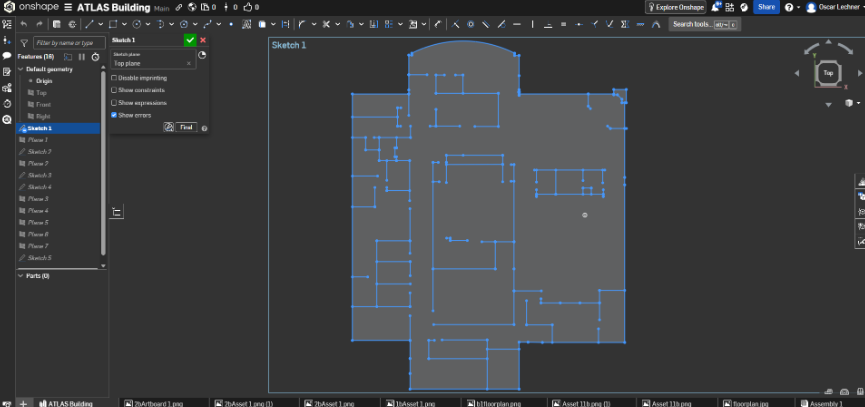
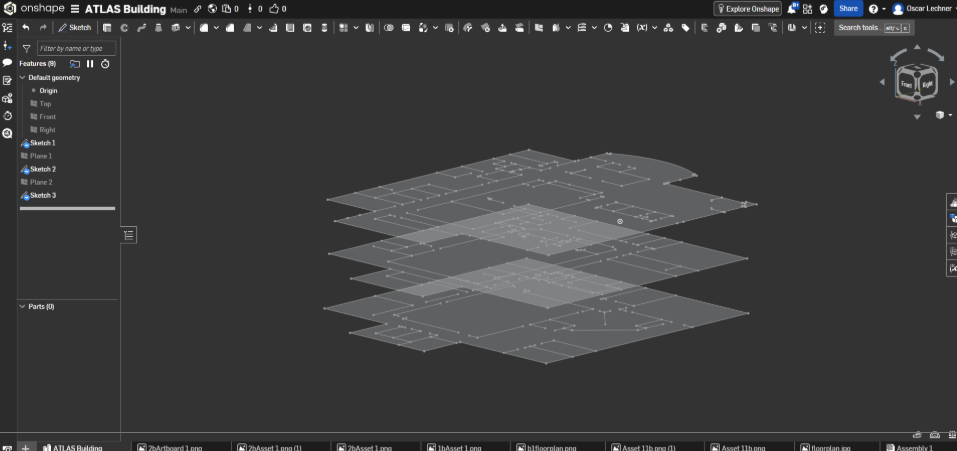
Iteration 1 Presentation
Built and delivered my iteration 1 presentation, showcasing the project concept, technical architecture, CAD model, and progress to date.
First Real-World Camera Test
Completed my first real-world camera test in the Williams Village dining hall, taking the detection system out of my room and into a live, crowded environment to validate performance with real foot traffic.
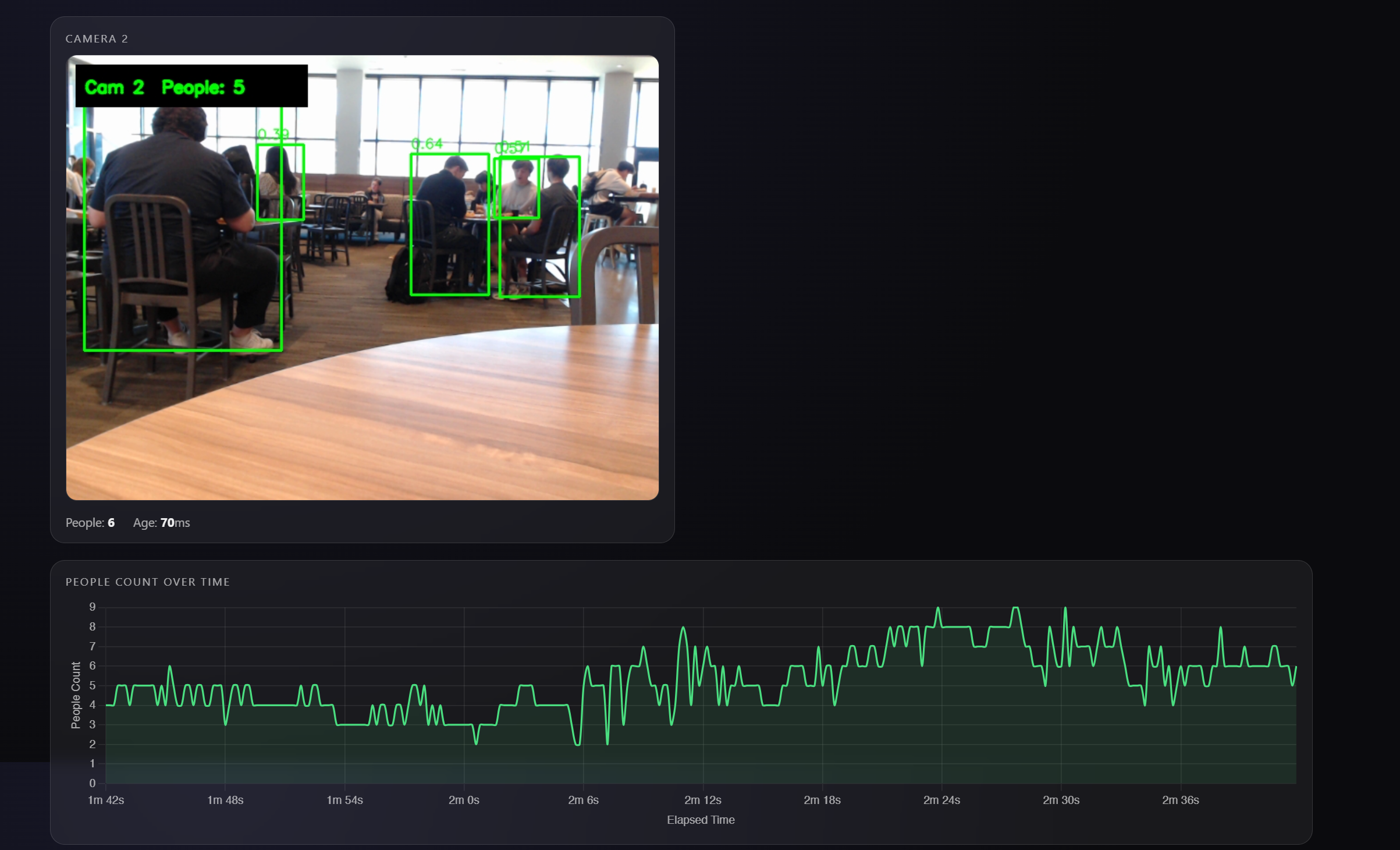
Camera Pipeline & Computing Power
Running multiple camera feeds with real-time YOLOv8 inference is demanding on a single machine. Began exploring splitting detection and visualization across separate machines to keep frame rates stable as camera count increases.
Key Insights
- Spatial planning matters - The CAD model revealed practical constraints like camera placement relative to stairwells for wired connections
- High-traffic zones are predictable - Past expos show consistent patterns in where people congregate, which helps prioritize camera placement
Next Week Goals
- Seek expert feedback through interviews with professors
- Begin building the forest visualization
- Continue optimizing the detection pipeline for multi-camera performance
Week 3: Multi-Camera Person Detection Server
January 20-26, 2026Goals
- Build a real-time person detection backend
- Support multiple simultaneous camera feeds
- Create a metrics API for TouchDesigner integration
- Connect TouchDesigner to live detection data
What I Accomplished
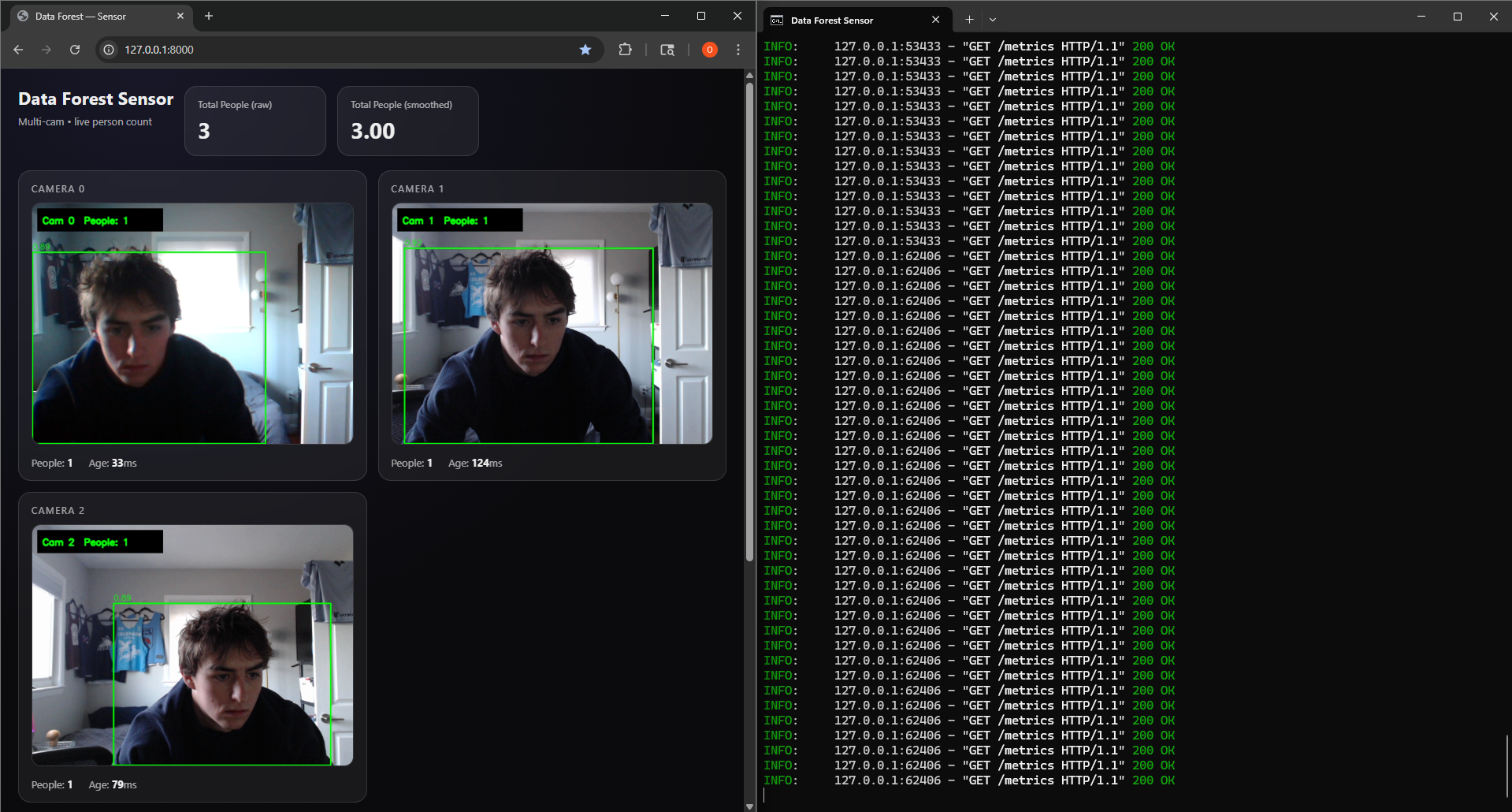
Data Forest Sensor Server
Built a multi-camera real-time person detection system using FastAPI, OpenCV, and YOLOv8. The architecture uses a multi-threaded design: each camera runs in its own CameraGrabber thread that continuously captures frames via cv2.VideoCapture, while a central SensorServer thread cycles through cameras running YOLOv8 inference to detect people.
Stack: Python, FastAPI, Uvicorn, OpenCV, Ultralytics YOLOv8 (nano), Pydantic
TouchDesigner Integration
Set up TouchDesigner to fetch data from the sensor server's web URL. The node network pulls metrics from the /metrics endpoint and can display the MJPEG video streams.
This YouTube channel was instrumental in learning TouchDesigner - tutorials and lessons from experienced TouchDesigner developers: The Interactive & Immersive HQ
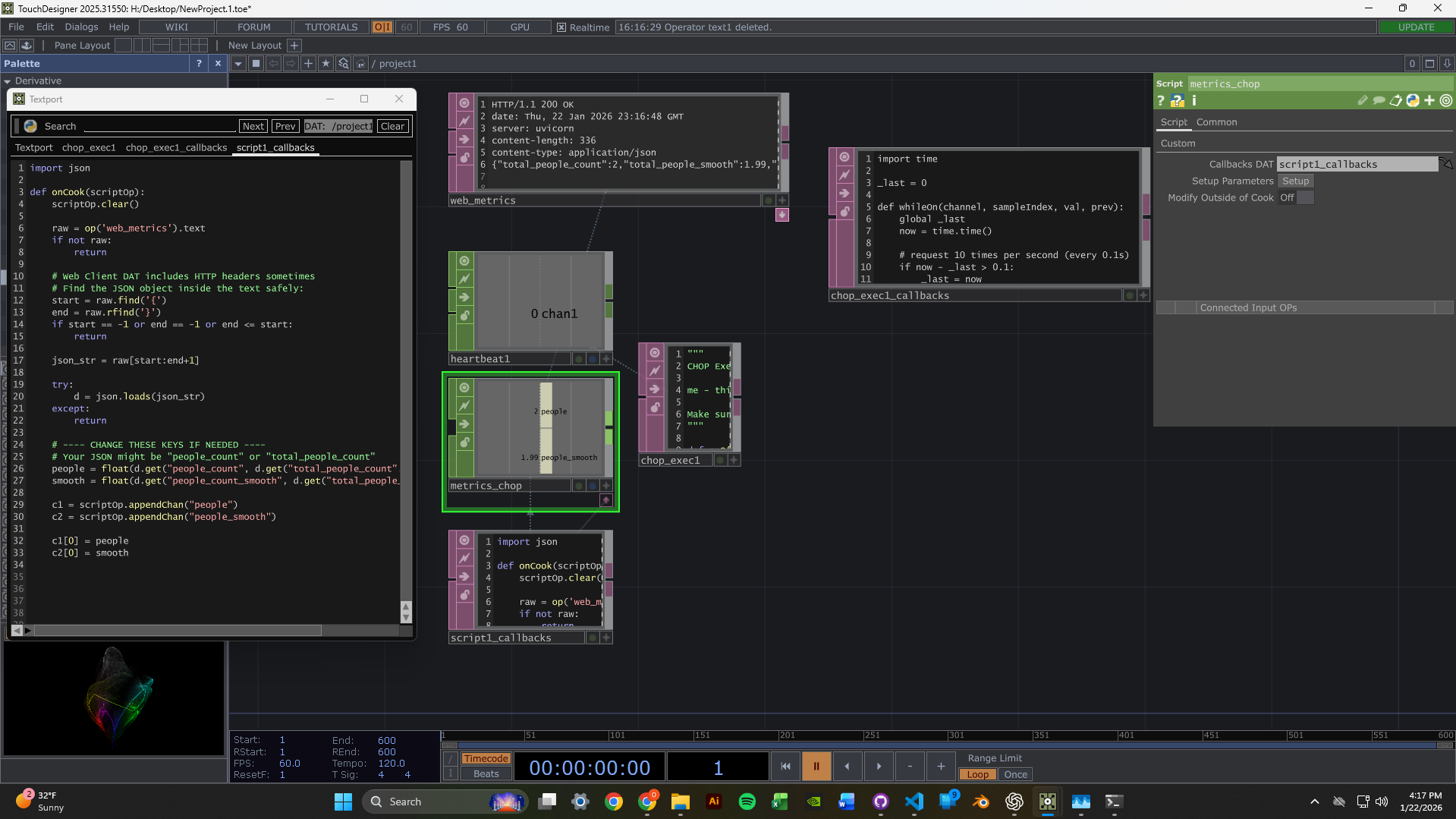
2-Camera Dashboard
Got the dashboard running with two simultaneous webcam feeds. Each feed shows live person detection with green bounding boxes and confidence scores. The metrics panel displays per-camera and aggregate people counts with exponential smoothing for stability.
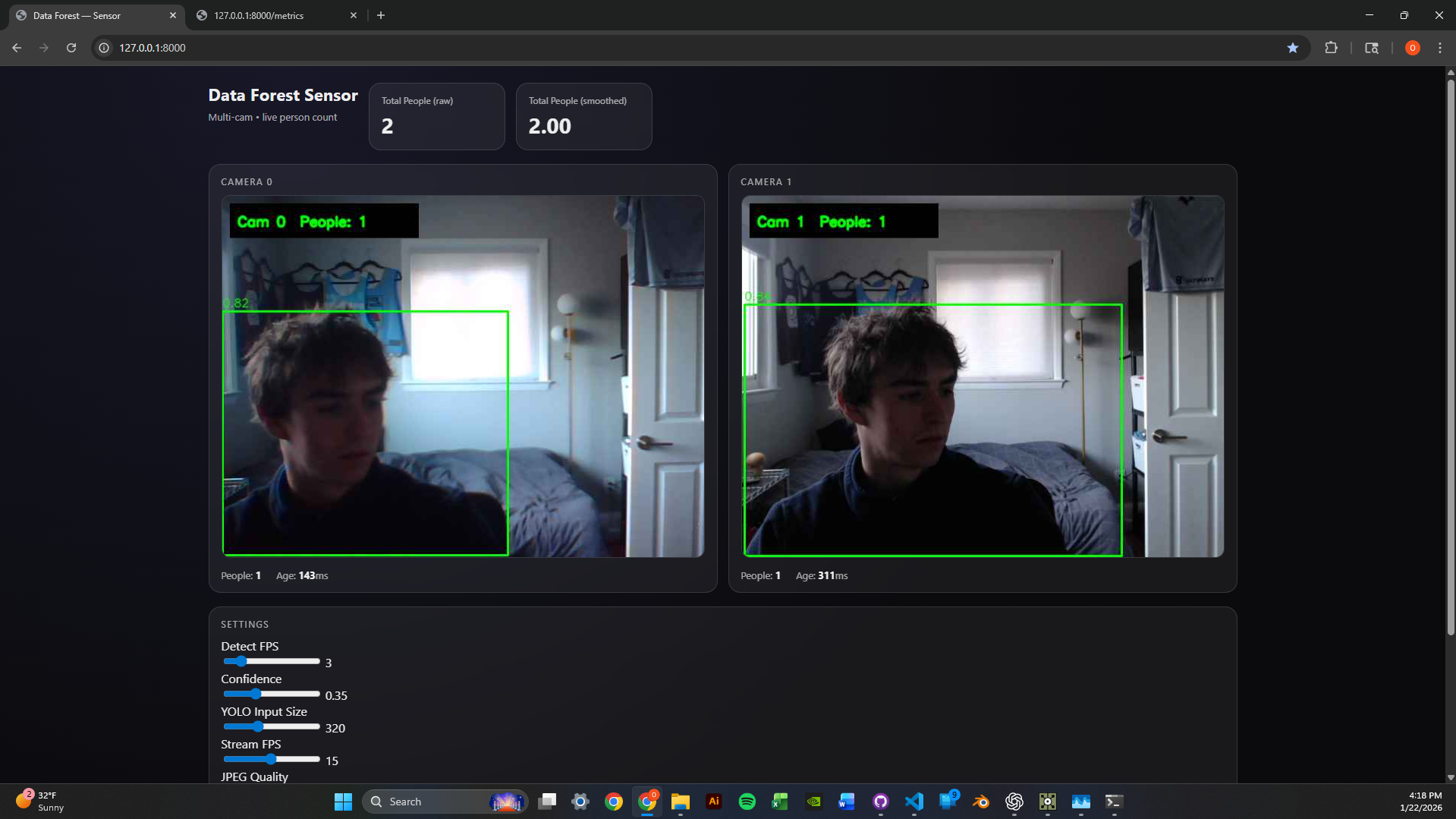
Scaled to 3 Cameras
Successfully scaled the system to handle 3 concurrent camera feeds. The round-robin detection loop maintains consistent performance by distributing inference time across all cameras. Runtime parameters like confidence threshold, image size, and detection FPS can be tuned via POST to /settings without restarting.
Technical Highlights
- Thread-safe frame grabbing - Each camera has its own CameraGrabber thread with lock-protected frame buffers
- MJPEG streaming - Frames served as /video_feed/{camera_id} endpoints for browser-native playback
- Metrics API - JSON endpoint returns per-camera counts, smoothed values, and frame ages
- Hot-reloadable settings - Adjust conf_thresh, imgsz, and detect_fps without server restart
Next Week Goals
- Create reactive TouchDesigner visuals driven by people count data
- Experiment with different visual responses to detection events
- Optimize latency between detection and visual feedback
Week 2: TouchDesigner & Computer Vision Setup
January 13-19, 2026Goals
- Learn TouchDesigner basics through beginner tutorials
- Set up a data pipeline to receive camera input in TouchDesigner
- Test webcams for computer vision capabilities
What I Accomplished
TouchDesigner Fundamentals
Familiarized myself with TouchDesigner's interface and workflow. Worked through beginner tutorials to understand the node-based system.
Data Pipeline Setup
Successfully set up a simple data pipeline receiver from a camera module - establishing the foundation for video input.
Webcam Testing
Webcams arrived! Set them up and began testing camera vision in my room, experimenting with tracking and input configuration.
Time Management Reflection
Hours This Week: ~4-5 hours (below 12-hour target)
I traveled Thursday-Monday, which significantly impacted my work time. This was not optimal. Moving forward, I'm committing to the full 12 hours now that I'm back and will better plan around life events.
Unexpected Lessons
- Node-based thinking is different - Requires a new mental model focused on signal flow rather than sequential code
- Camera quality matters - Positioning and lighting will be critical factors for detection accuracy
- Steep but powerful - TouchDesigner has a learning curve, but the potential for real-time visuals is clear
Next Week Goals
- Dedicate full 12 hours to the project
- Implement blob tracking or motion detection
- Create a basic interactive response system
- Document with photos/videos as I work